Most webcams fail in the same three places. The sensor is smaller than the box implies, the autofocus hunts the moment you lean back in your chair, and the front element has a fingerprint on it from the day you peeled the plastic off. I have been on camera for eight years, first streaming on Twitch and now shooting corporate video out of Austin, and the pattern has not changed once. A 4K webcam for streaming is only worth the money when the lens, the light, and the software around it are doing their jobs too.
This is the setup order I run before a camera goes on a podcast or a client call. It covers what actually matters in the camera, how to clean the glass properly, and the OBS settings that keep your face sharp and your audio from sounding like a box fan. It is not a spec sheet. It is a sequence.
Two pieces of gear carry the workflow below: a 4K webcam and a lens cleaning kit. Everything else you probably already own.
Why you should trust me
I am Alex. I have been streaming and producing video for eight years, from a Twitch channel that started with a hand-me-down camera to corporate shoots where the client watches the monitor over my shoulder. I run a weekly podcast on camera, which means I look at my own webcam frame more than I would like to admit.
Right now I am working through a stack of 2026 webcams in the same room, under the same lighting, asking one question: does my face look like me? That test kills more cameras than any resolution chart. I do not recommend a camera I would not put on my own podcast, and I do not trust a 4K claim without knowing what the sensor actually is.
What actually matters in a 4K webcam
Direct answers, in the order I check them.
Sensor size before resolution. The sensor is the camera. A 4K label on a chip the size of a grain of rice is marketing, not quality. A bigger sensor captures more light, and more light is what gives you clean skin tones in a dim office. If the listing will not tell you the sensor, that is the answer.
Dynamic range. This is how much detail survives when the window behind you is blown out and your face is in shadow. Good dynamic range is the difference between washed out and cinematic, and it matters more than the pixel count.
Autofocus behavior. Autofocus is a feature until it hunts. The best webcams let you lock focus so the camera stops hunting every time you move a coffee cup.
Field of view. Around 65 degrees is right for a solo face shot. Closer to 90 degrees is what you want for a desk shot or two people at one table. Cameras that give you only one option force you to fix it in software.
OBS compatibility. If a camera needs a driver fight before it shows up as a source, it is a toy. The test is simple: plug it in, add a video capture device, pick the camera, see a picture.
The mic is a backup plan. The microphone on a webcam exists for the day your main mic dies. The camera is the purchase. Treat onboard audio as insurance, not the plan.
The gear I would start with
Two items carry this workflow: the camera that captures the frame and the kit that keeps the glass in front of it clean.
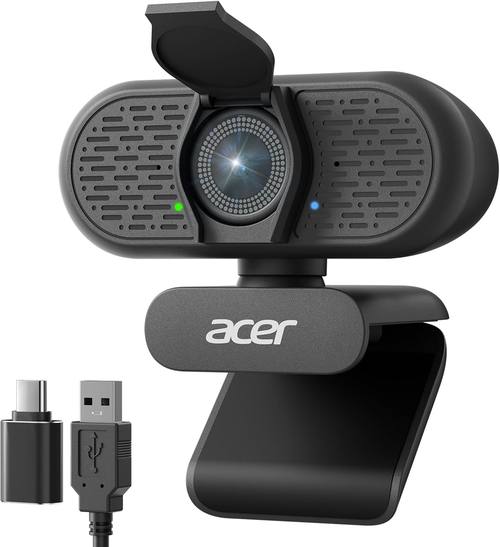
Our pick: Acer A640 4K Webcam with AI Noise Canceling Mic for Streaming Meetings
 Visit on Amazon →
The Acer A640 is the camera I would hand someone who wants 4K capture without rebuilding their desk. It records in 4K, and that resolution earns its keep in OBS for one specific reason: crop room. Shoot the wide 4K frame, crop to a tight face shot in the scene, and you still have full 1080p worth of pixels in the final stream. That is a better use of 4K than streaming 4K, which most platforms compress into mush anyway.
The AI noise canceling mic is the second reason it fits this workflow. On a meeting or a solo podcast, one cable for video and audio is one less thing to troubleshoot at the top of a recording. It is still a webcam mic, so if you own a real microphone, use the real microphone and keep this one as the backup.
For setup, mount it at eye level, add it as a video capture device in OBS, and capture at 4K while the output stays at 1080p. That combination gives you the crop room without asking your upload connection to carry a 4K stream.
Flaws but not dealbreakers: 4K capture eats USB bandwidth. Plug the camera into a USB 3 port on the machine itself, not into a hub already shared with a capture card and an external drive, or you will spend an evening blaming the camera for something the hub did.
Anyone who streams, teaches, or takes a lot of video calls and wants a clean frame without a DSLR rig will get the most out of it.
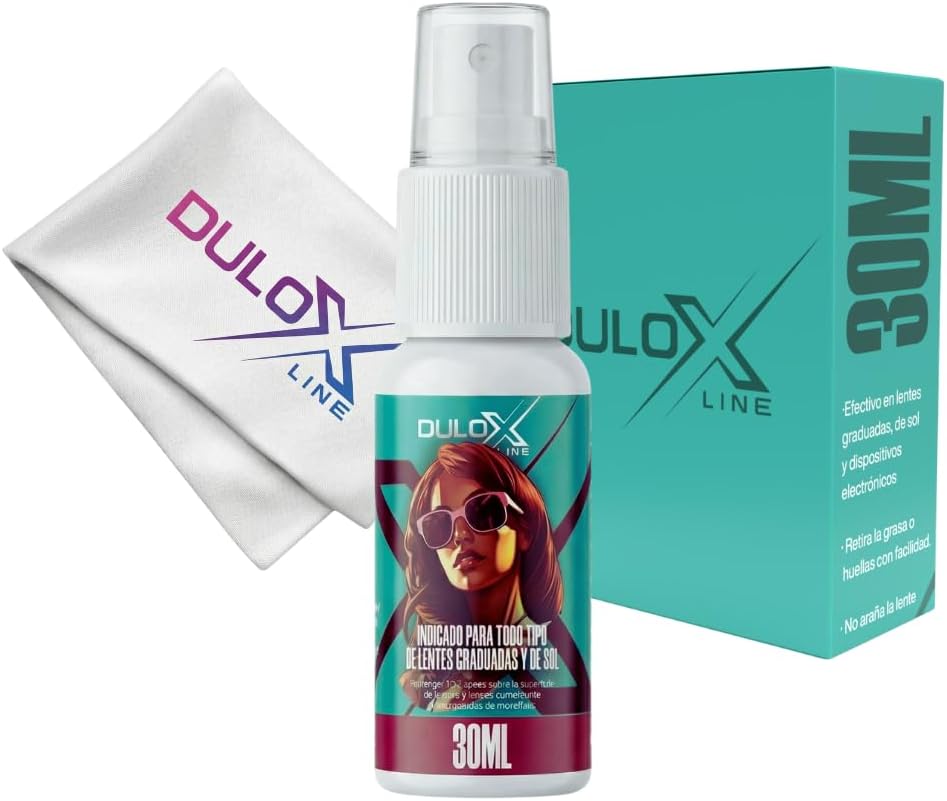
Supporting pick: Glasses Cleaner Spray Kit 1 Fl Oz Alcohol Free Lens Cleaner with 7 x 7 Inch Microfiber Cloth Safe for Coated Lenses Eyeglass Cleaner for Glasses Sunglasses Camera Lens Phone Tablet Screen
 Visit on Amazon →
The lens on your webcam is glass with a coating on it, and the coating is the part that fails. Alcohol free is the word that matters here, because an alcohol free formula is the safer default for coated optics. This kit pairs the spray with a 7 by 7 inch microfiber cloth, which is big enough to wrap a webcam lens or clean a pair of glasses without hunting for a dry corner. The bottle is 1 fl oz, a desk size, so it stays where you will actually reach for it.
Method matters more than the bottle: spray the cloth, not the lens. A direct spray can push liquid past the bezel and into the housing, and that is how a clean lens becomes a foggy sensor. One pass with the damp part of the cloth, then a second pass with the dry part, and you are done.
Flaws but not dealbreakers: It is a small bottle. If you clean lenses daily, you will go through it quickly. At this price, buying two is not a hard decision.
Anyone who wears glasses, shoots on a phone, or streams with a webcam has a use for this kit. It is the cheapest part of the setup and the one that fixes the most visible problem.
The setup workflow
The order matters. Run it this way and you skip the hour of guessing.
Step one: clean the glass. Before anything else, look at the lens with a light at an angle. Fingerprints and a film of desk dust scatter light and soften the image, and no amount of OBS tuning fixes dirty glass. Spray the microfiber cloth, wipe the lens, then buff it dry with the clean side.
Step two: mount the camera at eye level. A webcam sitting on a desk looks up your nose. Put it on top of the monitor, or on a small tripod behind the screen, so the lens is level with your eyes. This single change does more for how you look than any camera upgrade.
Step three: light your face, not the wall. Face a window, or put a light in front of you and slightly off to one side. A window behind you turns you into a silhouette and forces the camera to choose between your face and the bright background. Lighting beats hardware. A cheap camera in good light beats an expensive camera in bad light.
Step four: plug in direct and add the source. Connect the camera straight to the computer, open OBS, add a video capture device, and select the camera. If it does not appear in the list, fix that before you touch a single setting.
Step five: set capture and output separately. Capture at the camera's highest resolution, output at 1080p. On a 4K camera, that gives you crop room in the scene and a stream your upload connection can actually carry.
Step six: lock exposure and white balance. Auto exposure brightens the whole frame the moment you move and dims it the moment you lean in. Set exposure manually so your face stays consistent, and set white balance manually so your skin does not drift between warm and cold when a cloud passes. If the camera software allows it, lock focus too. Autofocus hunting during a podcast is the fastest way to look like an amateur.
Step seven: frame the shot. For a solo stream, sit so your eyes land about a third of the way down from the top of the frame, with a little headroom. If you shoot wide at 4K, crop in the scene until the framing looks like a portrait, not a security camera.
Step eight: check the audio path. If you use the webcam mic, listen to a thirty second recording before you go live. If you own a dedicated microphone, route that instead and leave the webcam mic muted so the room tone does not sneak into the mix.
Caveats: what 4K will not fix
A 4K webcam will not fix bad lighting. It will not make a small sensor perform in a dim room. It will not remove a fingerprint, and it will not stop an autofocus system from hunting if the software does not let you lock it. It also will not survive a USB hub already straining under a capture card, an external drive, and a ring light.
Two more things worth saying plainly. First, most platforms recompress your stream, so a 4K stream often arrives at your viewers looking like a soft 1080p. The crop room is the real benefit of 4K capture, not the number on the label. Second, your upload bandwidth is part of the camera chain. If the connection cannot hold the bitrate, the encoder drops quality and the new camera gets blamed for it.
If you wear glasses, expect one more variable: reflections. A light directly in front of you shows up in the lenses. Move the light higher and further to the side, and clean the glasses before you go live with the same cloth you use on the lens.
What this all costs
Two purchases, and they are not equal. The webcam is the investment. The cleaning kit is the cheapest item in the entire setup and the one that fixes the most common visible problem. Check current Amazon price on both before you buy, because both move around.
The cost math is simple. A camera you keep for three years costs pennies a day, and a lens cloth costs less than a coffee. Compare that to the alternative: an expensive camera with a smeared lens and auto exposure pumping, which looks worse than a clean 1080p camera with locked settings. The glass is the first thing the sensor sees. Keep it clean, keep the light in front of you, and lock the settings so the camera stops guessing.
That is the whole job. Your camera was built to do this. Let it.