Most people blame the webcam. The webcam is usually innocent.
A webcam lighting setup is the difference between a face that reads as a person and a face that reads as a witness sketch, and it costs a fraction of what a new camera does. I have been streaming and shooting corporate video for eight years, which means I have watched an embarrassing amount of my own footage back and cringed at most of it. The fix was almost never a new camera. It was one light in the right place, at the right color temperature, plus a lens that wasn't smeared with whatever was on my fingers.
This guide is the order I actually do things in. Light first, because light is most of how a webcam image looks. Then placement. Then color. Then the boring maintenance step that nobody does and everybody should, which is cleaning the glass in front of the sensor. You can do all of it in about twenty minutes, and none of it requires a driver install or a proprietary app.
Two pieces of gear do most of the work here. One is a small battery light you can clip to a monitor. The other is a cleaning kit, because a smudged lens undoes everything the light just fixed.
Why you should trust me
I run a weekly podcast on camera and I have been doing it since long before remote work made everyone an amateur broadcaster. In that time I have cycled through the Logitech C920 that started all of this for me, the 4K flagships, and a few of the cheap Amazon specials that make everyone look like a police sketch. I keep notes on sensor size and field of view, and I have opinions about both that people find tiresome at parties.
The opinion that matters for this article is the one I have repeated for years: lighting beats hardware. A mid-range webcam in good light beats a flagship webcam in bad light, every single time. I have proved that to myself on my own setup more often than I would like to admit, usually after buying something I did not need.
I also do not recommend anything I would not plug into my own desk. That is a low bar to clear and most gear clears it. The reason it still matters is that a lot of webcam accessories fail the simplest test there is, which is whether they work without a fight.
How I picked and what I looked for
For a light, I want four things. A color rendering index high enough that skin does not look gray, more than one color temperature so I can match the room, a way to mount it close to the camera, and a battery so I am not running another cable across the desk.
That last one is not a small thing. My desk already has a camera cable, a mic cable, a headphone cable, and a monitor cable running through it. Every additional power brick is another thing to trip over and another thing to unplug when I move the setup. A light with a built-in battery solves that.
For a cleaning kit, I want the opposite of complexity. Lens glass is coated, and coatings scratch. The right kit gives you a way to blow off grit before you touch the glass, a way to brush away what the blower missed, and a cloth plus solution for the actual smudge. What I do not want is a kit that encourages me to spray liquid directly onto a lens.
The criteria I ignored: app support, RGB modes, and anything that needs a firmware update before it turns on. None of that improves the image on a video call.
The gear that does the heavy lifting
Both of the items below solve a specific problem in the workflow. The light fixes your face. The kit keeps the image honest.
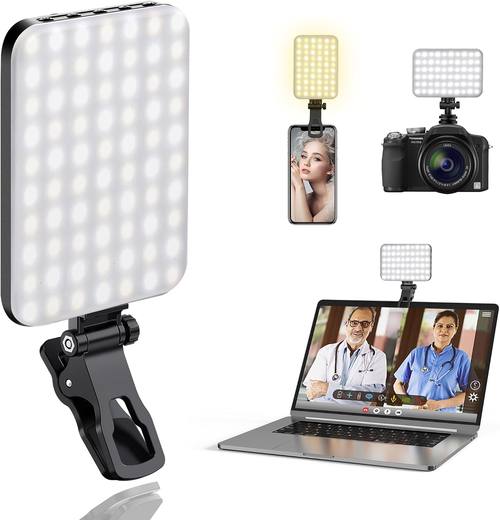
Our pick: ALTSON 60 LED Portable Selfie Light Video Conference Lighting with Clip & Camera Tripod Adapter Rechargeable 2200mAh CRI 97+, 3 Light Modes for Phone iPhone Webcam Laptop Photo Makeup
 Visit on Amazon →
Check current Amazon price. The spec that matters most here is the CRI 97 rating, which is the number that decides whether your skin tones look like skin tones or like a photocopy of skin tones. Cheap LED panels sit in the low 80s, and you can see it, even if you cannot name what is wrong. The face just looks slightly off, a little green or a little washed, and no amount of color correction in OBS fixes it cleanly.
The second useful thing is the three light modes, which means you can go warm, neutral, or cool depending on what is already in the room. If your office has warm overhead bulbs and your webcam is fighting them, this is how you stop the fight. Mixing a cool key light with warm room light is the single most common reason a face looks orange on one side and blue on the other.
The clip is the part that makes it practical. It goes on a monitor, a laptop lid, or a phone, and there is a tripod adapter in the box if you would rather stand it on a small tripod or a desk arm. The 2200mAh battery means it runs untethered, so you can reposition it mid-call without dragging a cable.
Flaws but not dealbreakers: This is a near-field light. It is designed to sit a foot or two from your face, and at that distance it works. Move it six feet back and it becomes a dim panel with a visible LED array. If you want a big soft source across the room, this is not that product.
Also, a light this small is inherently a bit specular. You will see a highlight on your forehead and nose. Diffusing it with a sheet of paper or a piece of tracing paper taped in front of it softens that considerably, and it costs nothing.
Anyone at a desk who wants to stop looking like a hostage video will get their money's worth here.
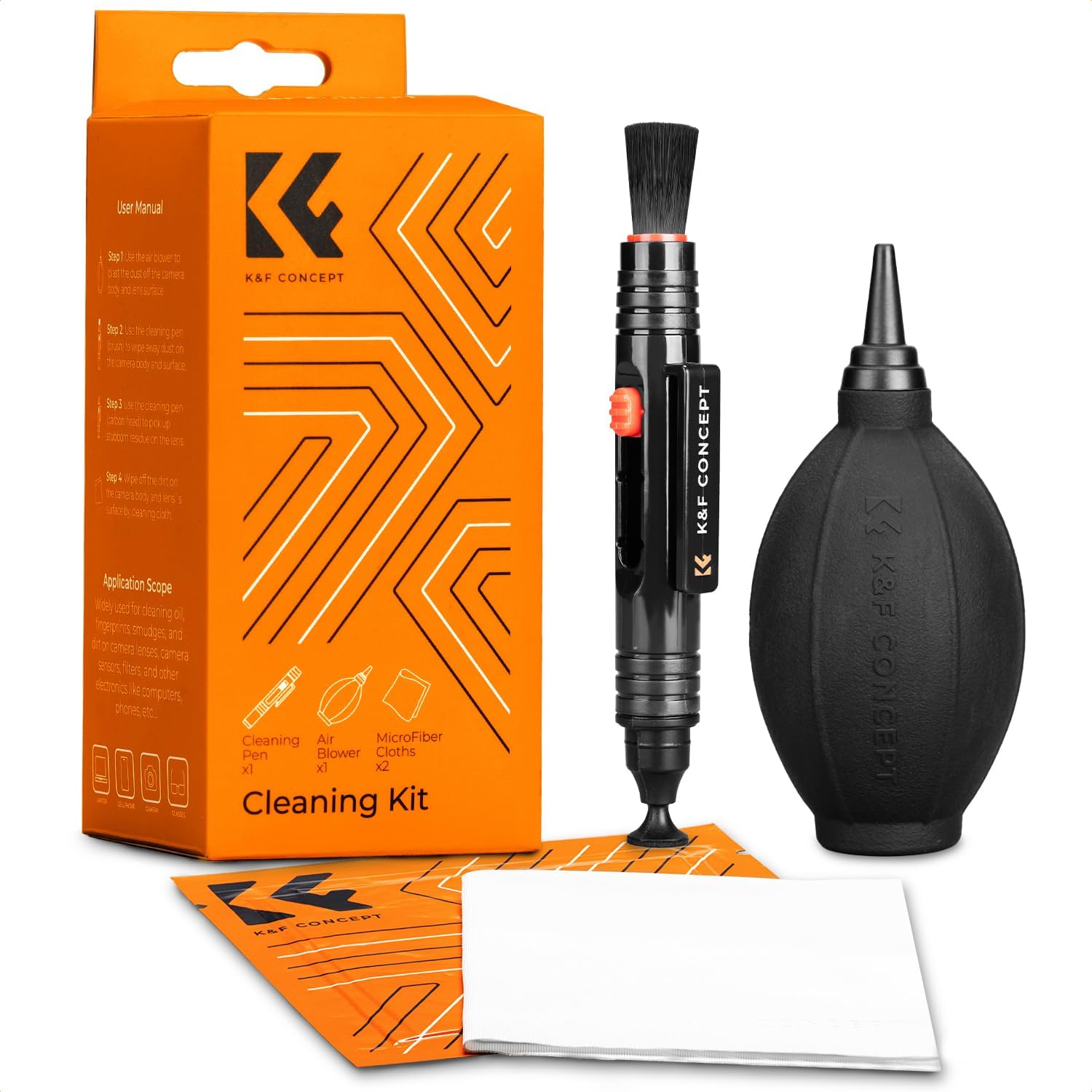
The kit that keeps the image honest: K&F CONCEPT 4 in 1 Camera Lens Cleaning Kit for Photography Beginner
 Visit on Amazon →
Check current Amazon price. This is the unglamorous half of the setup, and it is the half that people skip. A webcam lens sits on a desk, which means it collects dust, coffee mist, and fingerprints from the one time you touched it to check if it was on.
The point of a kit like this is that it gives you the right order of operations in one box, and the order matters more than the brand. Blow the grit off first. Brush away what the blower left behind. Then, and only then, use a cloth with solution. If you skip straight to wiping, you are dragging abrasive dust across a coated lens, and those micro-scratches never come out.
A 4-in-1 kit is the right level for a webcam owner. You do not need a full sensor cleaning kit with swabs and a loupe. You need something that lives in a desk drawer, comes out once a week, and takes thirty seconds.
Flaws but not dealbreakers: The included tools are sized for a beginner's kit, not a professional cleaning bench. If you shoot with interchangeable lenses and change them in the field, you will eventually want a bigger blower and a proper lens pen. For a webcam, a phone lens, and the occasional point-and-shoot, this covers it.
Anyone who has ever looked at their own video feed and wondered why it seemed soft should start here before blaming the camera.
Step by step: the webcam lighting setup
Here is the workflow. Do it in this order and you will not waste time on the wrong fix.
Step one: kill the bad light first. Before you add anything, turn off the overhead fixture and close the blinds behind you. Overhead light puts shadows in your eye sockets, and a bright window behind you turns your face into a silhouette. This step is free and it is worth more than any purchase on this page.
Step two: put the key light at roughly 45 degrees. Clip the light to your monitor and angle it so it comes from slightly to one side of the camera, not dead center. Dead center light flattens your face. A slight angle gives you a shadow on one side of the nose and jaw, which is what makes a face read as three-dimensional.
Step three: get the light above eye level, but only slightly. A few inches above the camera is the sweet spot. Too high and you get raccoon shadows under the eyes. Too low and you get the horror-movie uplight look.
Step four: match the color temperature to the room. Cycle through the modes and pick the one that looks closest to the ambient light in the room. If your overheads are warm, go warm. If you have a cool-toned office, go neutral or cool. The goal is a face that looks lit by one source, not two.
Step five: turn the brightness down. This is the step everyone gets wrong. People crank the light because brighter feels better, then wonder why their forehead is a white blob with no detail. Bring it up until your face is evenly lit, then back it off a notch. Detail in the highlights is what separates a decent image from a blown-out one.
Step six: add fill if one side of your face is too dark. You do not need a second light. Bounce the existing one off a white wall, or put a sheet of white paper on the desk opposite the key light. That lifts the shadow side just enough.
Step seven: check the composition against the light. Once the light is set, look at your background. The key light will also brighten whatever is behind you, and a bright background pulls attention off your face. Move the light, or move the clutter.
Step eight: clean the lens. Blow, brush, then cloth with solution. Do this before every important call, not once a month. It takes thirty seconds and it is the difference between crisp and hazy.
Step nine: verify in your actual app. Open the app you actually use, whether that is Zoom, Teams, Meet, or OBS, and look at the preview there. Some apps apply their own auto-exposure and auto-white-balance on top of your lighting, and those automatic adjustments can undo your work. If your app has manual exposure and white balance controls, lock them. Autofocus hunting and auto-exposure breathing are the two things that make a well-lit face look amateur.
Where this goes wrong
The most common failure is a light that is too close and too bright. It produces hot spots on the forehead and nose, and it makes skin look oily. Move it back a few inches or dim it.
The second most common failure is mixed color temperature. You fix your key light, but the window behind you is daylight, the overheads are warm, and the monitor is cool. Your face ends up three colors. Fix the room before you fix the light.
The third is mounting. A clip light on a thin laptop lid will sag, and it will wobble every time you type. Clip it to a monitor or stand it on a tripod adapter if your laptop lid is flimsy.
The fourth is cleaning technique. Do not use your shirt. Do not spray solution onto the lens. Do not press hard. Gentle and in circles, with a clean cloth.
The competition and why it lost
Ring lights are the default recommendation and they are fine, but they are bulky and they need a stand and a cable. For a desk setup where the light can sit close to your face, a clip light does the same job in less space. A ring light earns its place when you want the round catchlight in your eyes or you need the source further back.
Big softboxes and key lights are genuinely better light. They are also a commitment: a stand, a power cable, a diffuser, and floor space you may not have. If you are building a dedicated studio, go that route. If you are working from a desk in a shared room, the small light wins on practicality.
The do-nothing option is a window. A window at the right time of day is the best free key light there is. It is also inconsistent, it changes with the weather, and it disappears at sunset. That is why I still keep a light on the desk.
The camera itself is the last thing to change. If your lighting is good and your lens is clean, a mid-range webcam looks better than you expect. Upgrade the camera only after you have done the free work.
What this all costs
Both items here sit in the impulse-buy range rather than the gear-budget range. Check current Amazon price for the light and the kit and you will see what I mean. There is no stand, no power brick, and no software license in the total.
The math that matters is not the purchase price. It is the twenty minutes you spend positioning the light, matching the color, and cleaning the glass. That twenty minutes is the difference between a camera showing most of what it can do and the same camera showing a washed-out, hazy version of you.
Set it up once, note the position and the mode you landed on, and leave it alone. The next time someone tells you your video looks good, you will know exactly why.